Collections are folders for organizing your own Gemini Notebook dashboard, live on notebook.google.com under a new tab next to "Shared with me." You create one, name it, optionally give it an emoji icon, and add existing notebooks to it. A single notebook can belong to more than one Collection at once, so a thesis notebook can sit in both "Dissertation" and "Spring Semester" simultaneously. Two things it does not do: you can't share a Collection with anyone else, and you can't nest one Collection inside another. Both are the most-requested follow-ups since launch.
Google hasn't published its own help-center article for this feature as of this writing, so every mechanic below is verified against the original announcement and hands-on press coverage from launch week, not an official documentation page.
If you searched for this expecting a Google support page, that's why you didn't find one: Collections launched via a post on Gemini Notebook's own X account on Monday, 20 July 2026, rolling out to all users, and as of 19 August 2026 there's still no dedicated entry in Google's help center covering it. That's unusual for a shipped, all-user feature, and it means this guide is working from the same primary sources everyone else is: the launch announcement and what reporters who tried it found, including Android Police's hands-on coverage.
What a Collection actually is
A Collection is a named group that a notebook can belong to. It's purely organizational, layered on top of your existing notebooks rather than replacing anything about how they work individually. Creating one takes three steps: open the Collections tab (it sits next to "Shared with me" on the notebook.google.com dashboard), tap Create new, and give it a name plus an optional emoji icon. From there, select one or more notebooks from your dashboard and choose Add to Collection.
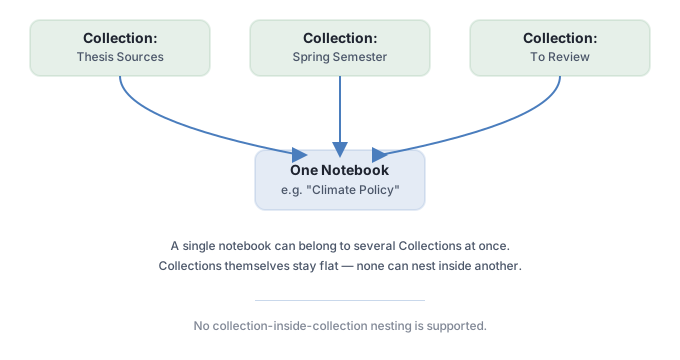
The detail that makes this more useful than a simple folder system: a notebook isn't locked to one Collection. You can add the same notebook to as many Collections as make sense, so a single research notebook on, say, climate policy could live in a "Thesis" Collection, a "Sources to Cite" Collection, and a "Spring Semester" Collection at the same time, without duplicating the notebook itself. Every source, every chat, every generated Audio Overview inside it stays exactly the same across all three views. You're organizing pointers to the notebook, not copies of it.
The two things Collections can't do
- No sharing. A Collection is private to you. You can still share an individual notebook the normal way (up to 50 collaborators on a personal account), but there's no way to hand someone the whole folder structure. If your team needs a shared view of "all the notebooks for this project," Collections doesn't solve that yet. Google has reportedly signaled interest in adding sharing later via a reply on X, but that's an informal signal, not a committed roadmap item, so don't plan around it.
- No nesting. Collections are flat. You can't put a Collection inside another Collection to build a folder hierarchy ("Research" > "2026" > "Q3"). If your organizational scheme needs more than one level, you're stuck naming Collections descriptively enough to fake it ("Research 2026 Q3") rather than actually nesting them.
A third gap worth flagging honestly: Google hasn't published a limit on how many Collections you can create or how many notebooks fit in one. That's not confirmed as unlimited, either; it's simply undocumented. If you're planning an organizational scheme with dozens of Collections, there's no official number to plan against yet.
Collections vs. three features that sound similar
Gemini Notebook has accumulated several features that use overlapping language, and search results conflate them constantly. Here's the actual distinction between each.
Feature              What it is                          Shared?   Yours only?
----------------------------------------------------------------------------------
Collections           Folders you make to organize          No        Yes
                       your own notebooks
Featured notebooks     Google-curated public notebooks       N/A       No (Google's)
                       (The Economist, The Atlantic, etc.)
Public notebooks       A notebook YOU publish for anyone      Yes       Started as yours
                       to view (140,000+ in its first month, mid-2025)
Source labels          Auto-grouped clusters of sources       Yes,      No — lives inside
                       inside ONE notebook (5+ sources)        visible   a single notebook
                                                                to collabs
Featured notebooks launched back in July 2025 and is unrelated to your own organization scheme: it's a tab of notebooks Google itself curated from publishers like The Economist and The Atlantic, meant to showcase what a well-built notebook can look like. Public notebooks is the feature that lets you publish one of your own notebooks for anyone to view; over 140,000 were created in its first month alone, back in mid-2025. Source labels is narrower still: inside a single notebook with five or more sources, Gemini Notebook auto-clusters them into labeled groups, visible to anyone you've shared that notebook with. None of these three let you group multiple separate notebooks into a folder the way Collections does; that gap is exactly what Collections was built to close.
One more adjacent term to rule out: tags. Some third-party Chrome extensions (NotebookLM Folders, NotebookLM Organizer) added tagging before Google shipped Collections natively, and a couple of guides online still describe "tags" as if they were a native Gemini Notebook feature. They aren't. Any tagging you see is browser-local, added by an extension, invisible to Google's own product, and invisible to anyone else viewing the same notebook. If organizing your notebooks matters enough that you're considering a browser extension for it, Collections now covers the core use case without one.
How this compares to ChatGPT Projects, Claude Projects, and Perplexity Spaces
Every major AI assistant has shipped some version of "group your stuff together" over the past year, and Collections' multi-membership design is a genuine point of difference. ChatGPT Projects, Claude Projects, and Perplexity Spaces all use a single-container model: a conversation or file lives inside one Project or Space, full stop. If it belongs conceptually to two different projects, you're choosing one home for it or duplicating it. Collections skips that tradeoff by letting one notebook belong to several Collections simultaneously, which fits how research actually branches, a set of sources rarely serves exactly one purpose.
A practical organizing scheme
A workable pattern for anyone with more than 10-15 notebooks: build Collections around two different axes rather than one. Create one set by subject ("Climate Policy," "Product Research," "Thesis Sources") and a second, cross-cutting set by status or time ("Spring Semester," "Active," "To Review," "Archive"). Because a notebook can sit in both a subject Collection and a status Collection at once, you get a two-dimensional filter without any of Google's help. A notebook you're actively using for your thesis lands in both "Thesis Sources" and "Active"; once the semester ends, you leave it in "Thesis Sources" and swap it into "Archive." That's the practical workaround for the missing nesting feature: use a second Collection as the axis you'd otherwise have nested.
Three starter setups, by who's using them
The two-axis pattern above is abstract until you see it applied. Here's how it plays out for three different kinds of readers of this site.
- A student juggling multiple classes. Build one Collection per course ("Organic Chemistry," "European History," "Thesis") and a second set for the calendar ("Fall 2026," "Spring 2026"). A notebook of lecture recordings for Organic Chemistry lands in both "Organic Chemistry" and "Fall 2026." At the end of the term, you're not deleting or moving anything, you just stop adding new sources to that notebook and let the semester Collection do the archiving for you.
- A researcher managing a literature review. Subject Collections track sub-topics of the review itself ("Methodology," "Related Work," "Data Sources"), while a second set tracks review stage ("To Read," "Annotated," "Cited"). A single paper's notebook can move through "To Read" into "Annotated" over its lifecycle while staying permanently filed under whichever sub-topic Collection it belongs to.
- A product manager tracking competitive intelligence. One Collection per competitor ("Competitor A," "Competitor B") crossed with a Collection per intelligence type ("Pricing Changes," "Feature Launches," "Public Reviews"). A notebook built from a competitor's pricing page and its Reddit reception sits in that competitor's Collection and the "Pricing Changes" Collection simultaneously, so you can pull up everything about one competitor, or everything about pricing moves across every competitor, from the same set of notebooks.
In each case, the pattern is the same: one axis answers "what is this about," the second answers "where is this in its lifecycle or when does it matter." Multi-membership is what makes both questions answerable from the same notebook without duplicating anything.
Why this shipped now, and the demand that came before it
Google was spotted testing a Collections-like feature in Gemini Notebook's code as early as 27 June 2026, weeks before the 20 July public launch, per pre-launch reporting from TestingCatalog. That gap between spotted-in-code and shipped-to-everyone is a reasonable amount of internal testing time for a feature that touches every user's dashboard.
The demand was already visible before Google shipped anything: third-party Chrome extensions with names like NotebookLM Folders and NotebookLM Organizer existed specifically to bolt folder-style organization onto a product that didn't have it natively. Those extensions still exist and some, like nlmtools.com's offering, add bulk-add and tagging on top of what Google now provides natively, which is worth knowing if you were using one of them before Collections launched: the native feature covers the core folder use case, but extension-specific features like tags remain extension-only and stay invisible to Google's own product and to anyone else viewing your notebook.
If you don't see Collections yet
The feature is described as having rolled out to all users starting 20 July 2026, but staged rollouts of Google features routinely take days to weeks to reach every account, and nothing in the launch announcement guarantees same-day availability for every user worldwide. If the Collections tab isn't showing up next to "Shared with me" on notebook.google.com, the most likely explanations, in rough order of likelihood, are: your account hasn't received the rollout yet, you're on a Workspace/school account where an admin setting is gating it, or you're checking the mobile app specifically, where native support isn't confirmed either way by any source found for this guide. A browser refresh or checking again in a few days covers the first case; the other two require checking with your Workspace admin or simply testing the web dashboard directly.
People also ask
Can I share a Collection with someone else?
No. Collections are private to your own account. You can still share an individual notebook the normal way; there's just no way to share the folder grouping itself.
Can one notebook be in more than one Collection?
Yes, and this is the feature's main advantage over a simple folder system. A single notebook can belong to as many Collections as you want, with everything inside it staying identical across every view.
Can I nest Collections inside other Collections?
No. Collections are a flat, single-level structure. If you need a hierarchy, use a second Collection as a cross-cutting axis instead of trying to nest one inside another.
What's the difference between Collections and Featured notebooks?
Collections are folders you build yourself to organize your own notebooks. Featured notebooks is a Google-curated public showcase of notebooks made by outside publishers like The Economist. They share loose terminology but are entirely different features.
Is there a limit on how many Collections I can create?
Google hasn't published one. That's not confirmation it's unlimited, just that no official cap exists as of this writing, so don't plan an organizational scheme around a specific ceiling.
Does Collections work on the Gemini Notebook mobile app?
This isn't documented by Google or confirmed in press coverage from launch week. Treat mobile-app parity as unconfirmed until you've checked your own app.