Gemini Notebook's real limit table, verified against Google's own support pages, spans five consumer tiers: Standard (free), Plus, Pro, Ultra 20TB, and Ultra 30TB. Notebooks per user run 100 to 500, sources per notebook 50 to 600, chat queries 50 to 5,000 a day, and Audio/Video Overviews 3 to 200 a day. Daily quotas reset after 24 hours, not necessarily at midnight in any particular timezone, since Google's own wording never names a fixed clock time. A couple of numbers people ask about most, the exact Collections cap and the exact chat-message character limit, simply aren't published anywhere. This guide says so explicitly rather than guessing.
If you're specifically here for the 50-source free-tier cap, our dedicated workaround guide covers merging files and stretching that number further than the table below.
Two existing pages on this site already cover pieces of this: the source-limit workarounds for the free tier's 50-source cap, and the per-source word limit of 500,000 words. Neither one puts every limit, notebooks, chats, Audio Overviews, context window, sharing, in a single reference. That's what this page is for.
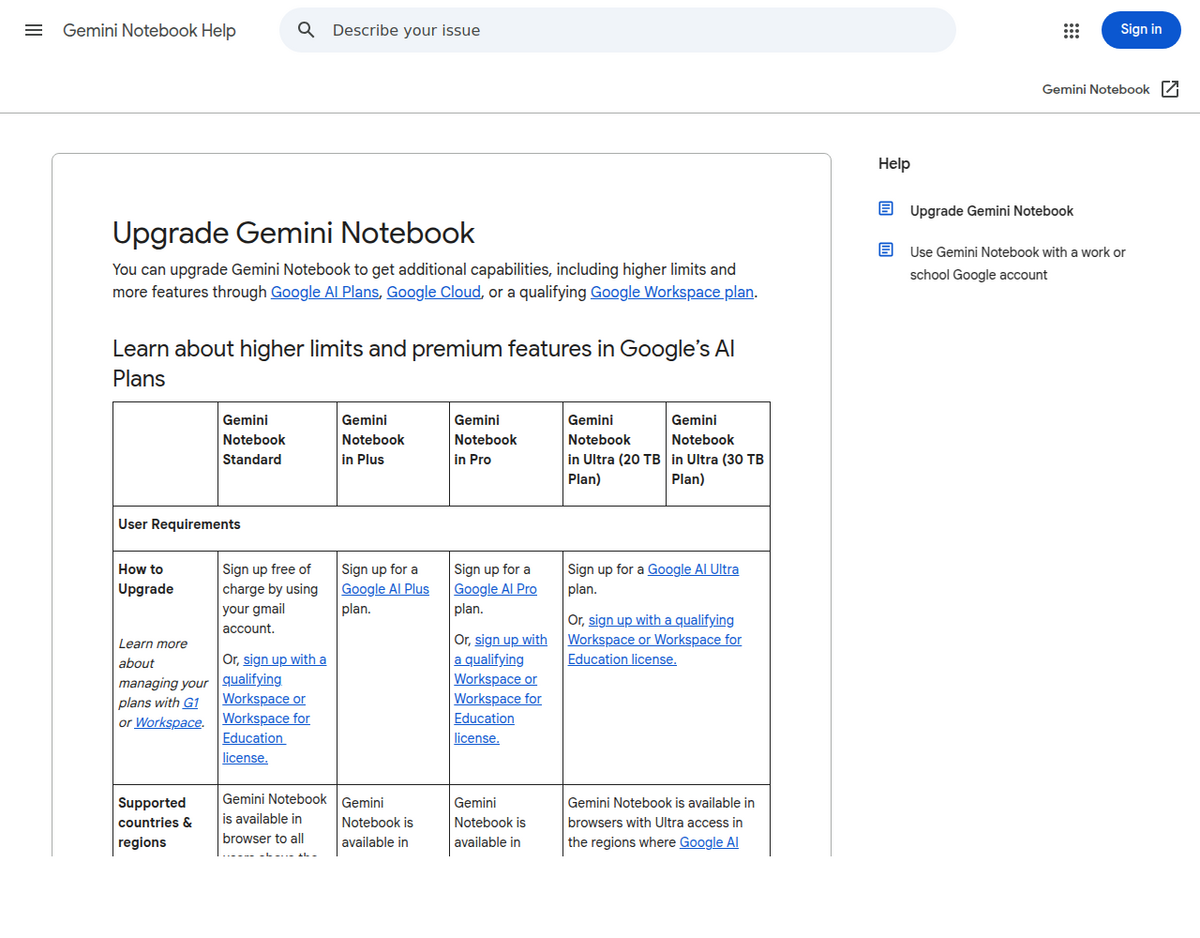
The full tier table
Every number below comes directly from Google's own "Upgrade Gemini Notebook" support page, verified 19 August 2026. Treat this as the primary source for the whole table.
                          Standard   Plus    Pro    Ultra 20TB   Ultra 30TB
--------------------------------------------------------------------------
Notebooks/user               100      200     500       500          500
Sources/notebook               50     100     300       500          600
Chat queries/day               50     200     500     2,500        5,000
Audio Overviews/day             3       6      20       100          200
Video Overviews/day             3       6      20       100          200
Cinematic Video Overviews/day   —       —       2        10           20
Reports/day                    10      20     100       500        1,000
Flashcards/day                 10      20     100       500        1,000
Quizzes/day                    10      20     100       500        1,000
Mind Maps/day                  10      20     100       500        1,000
Deep Research               10/mo   3/day  20/day    75/day      200/day

Source: support.google.com/notebooklm/answer/16213268, verified 19 Aug 2026
Two things about this table are worth calling out before you plan around it. Google's own reset language is "daily quotas are reset after 24 hours; monthly quotas are reset after 30 days," with no clock time attached. Several independent guides claim the reset is tied to your first use each day rather than a fixed midnight cutoff, which is consistent with that wording, but no Google page confirms the anchor point directly. Treat "resets at midnight" as a common assumption, not a documented fact. And Deep Research changes shape entirely between Standard and every paid tier: it's a monthly allowance on the free plan (10 a month) and a daily one everywhere else, which is easy to misread if you're skimming.
Source size limits
These are separate from the sources-per-notebook count above; they cap how big any single source can be.
- 500,000 words per source, on every consumer tier. This is confirmed on Google's FAQ page and matches our dedicated word-limit guide.
- 200MB per uploaded file, consumer tiers.
- No page limit on a source. Google's own FAQ states this explicitly: "There's no page limit." A 3,000-page PDF is fine as long as it's under the word and file-size ceilings.
- Gemini Notebook Enterprise uses a different number: under 500MB or 500,000 words, whichever comes first, per our dedicated Enterprise guide, which verified it against Google Cloud's current setup documentation. That's a materially larger file-size allowance than the consumer 200MB cap, even though the word ceiling matches.
- Enterprise spreadsheets cap around 150,000 active cells per sheet, with each sheet in a workbook processed separately.
The context-window contradiction
This is the one place two Google pages genuinely disagree, and it's worth presenting both rather than picking a winner. Google's general Gemini Apps limits page states a tiered context window: 32,000 tokens without a paid AI plan, 128,000 tokens on Google AI Plus, and 1 million tokens on Pro or Ultra. But Google's own NotebookLM product blog post, announcing chat upgrades, states that Gemini Notebook chat now uses "the full 1 million token context window of Gemini in NotebookLM chat across all plans," including free.
Neither page cross-references the other, and nothing on either resolves the conflict. The Gemini Apps page describes Gemini broadly, not NotebookLM specifically, so it's plausible NotebookLM's chat genuinely got an exemption from the general tiering, but that's an inference, not a confirmed reconciliation. If the exact context window matters for your use case, the safer read is: NotebookLM's own blog claims 1M tokens on every plan, but Google hasn't corrected or removed the older tiered figure, so verify against your own account's behavior rather than assuming either page is fully current.
One reason this discrepancy matters less in practice than it sounds: NotebookLM doesn't dump your entire source library into the context window linearly the way a raw chat context limit implies. It uses retrieval-augmented generation, indexing your sources and pulling in the relevant passages per query, rather than loading every word of every source into one prompt. That's why a notebook with 500,000-word sources and a 300-source cap can still function coherently even against a 32k-token worst case; the model isn't reading everything at once for every answer.
Sharing and collaboration
Personal Gmail accounts can share a single notebook with up to 50 collaborators, and notebooks cannot be shared with Google Groups directly. University or Workspace domain accounts sometimes get broader internal sharing depending on their organization's admin settings, that's an institution-specific configuration, not a universal number, so a school or employer account may behave differently than a personal one.
What Google does not publish
Being straightforward about the gaps matters more than filling them with a guess. As of 19 August 2026, none of the following have a documented, Google-sourced number:
- Collections limits. No cap on how many Collections you can create or how many notebooks fit inside one. See our Collections guide for what the feature does; the count ceilings simply aren't published.
- Ordinary chat message length. There's a documented 10,000-character limit on the notebook customization/persona field specifically (up from 500, changed December 2025), but no published cap on a normal chat question you type into the box.
- A handful of Cloud Enterprise numbers that don't fit neatly into a consumer-tier table. Cloud Enterprise itself does publish per-user quotas, 500 notebooks, 300 sources per notebook, 500 queries per user per day, 20 a day each for Audio Overviews, Video Overviews, mind maps, and reports, per our dedicated Enterprise guide, but Google Cloud's own licensing page stops short of a public price for pricing above 5,000 licenses, and the exact audit-logging rollout timeline for Workspace-bundled Plus remains genuinely unpublished.
- Audio/Video Overview length caps. The daily generation counts above are documented; how long any single Overview can run isn't pinned down by a primary Google source, only by scattered secondary reports.
Which limit you'll actually hit first
The tier table answers "what's the ceiling," but not "which ceiling matters to me." In practice, three different usage patterns run into three different walls first.
- Casual note-taker, free tier. You'll hit the 3-Audio-Overview daily cap or the 50-chat-query daily cap long before you come close to 100 notebooks or 50 sources per notebook. If Audio Overviews are your main use case, the daily generation count, not the source or notebook count, is the number to watch.
- Student or researcher building a large literature review, paid tier. The source-per-notebook cap (100-600 depending on plan) is the one you'll hit first, well before the notebook count or daily query allowance become a factor. This is exactly the scenario our source-limits workaround guide is written for.
- Someone running many small, separate projects. The notebook-per-user cap (100-500) becomes the binding constraint before any single notebook's source count does, since each project only needs a handful of sources but you're creating a new notebook for every one.
- A team or org relying on Workspace-bundled Plus. The binding constraint often isn't a number at all, it's the audit-logging and compliance gap on that path, covered in our Enterprise guide, which matters more than any of the numeric ceilings for a regulated workload.
How these limits compare to ChatGPT, Claude, and Perplexity
Context and usage limits aren't unique to Gemini Notebook, every major AI product rations something, but the shape of the rationing differs in a way worth knowing if you're deciding between tools. ChatGPT's free tier and Claude's free tier both cap on message count within a rolling time window rather than a source or document count, since neither is fundamentally a document-corpus tool the way Gemini Notebook is; the exact message counts change often enough that we won't pin a number here. Perplexity's free tier similarly caps on query count rather than source count. None of the three general-purpose chat competitors publish a per-notebook or per-project source cap comparable to Gemini Notebook's 50-600 range, because none of them are organized around a persistent, citation-backed document corpus the same way; ChatGPT Projects and Claude Projects hold files, but neither publishes a source-count ceiling as explicit as Google's tier table above.
The practical takeaway: if your bottleneck is "how many separate documents can I ground my answers in," Gemini Notebook's explicit, published per-tier numbers are actually more useful to plan around than the vaguer rate-limit language competitors use, even though Google's own numbers, as this guide has shown, come with real documentation gaps of their own.
Real complaints from Google's own community forums
A few patterns show up repeatedly in Google's own support community, worth knowing before you hit them yourself. Multiple threads describe users unable to find a plain-language answer to "what are my exact limits on this plan," which is the exact confusion this guide exists to resolve. A separate admin-reported thread on Google's Workspace community describes a bug where the Reports feature stopped generating for some users. And a recurring complaint, distinct from the daily-count limits above, is that Audio Overviews sometimes ignore a requested length (someone asks for a 3-minute overview and gets 14), a quality issue rather than a quota issue, but one that compounds the confusion around "limits" broadly.
People also ask
How many sources can I add to a Gemini Notebook notebook?
It depends on your tier: 50 on Standard (free), 100 on Plus, 300 on Pro, 500 on Ultra 20TB, and 600 on Ultra 30TB. See our dedicated source-limits guide for workarounds if you're on the free tier.
Does NotebookLM's daily limit reset at midnight?
Google states quotas reset "after 24 hours," without naming a fixed clock time or timezone. Community reports suggest the window may anchor to your first use of the day rather than a calendar midnight, but this isn't confirmed by a Google source.
What happens if I hit my notebook or source limit?
You won't be able to create a new notebook or add another source until you're under the cap again, delete something, or upgrade to a tier with a higher ceiling.
Is NotebookLM's context window 32,000 tokens or 1 million tokens?
Google's pages disagree. The general Gemini Apps limits page shows a tiered 32k/128k/1M breakdown by plan; Google's own NotebookLM blog post claims the full 1 million token window applies across all plans specifically for NotebookLM chat. Neither page resolves the conflict, so verify against your own account rather than assuming either figure.
How many people can I share one notebook with?
Up to 50 collaborators on a personal Gmail account. Notebooks can't be shared with Google Groups directly, and Workspace/school accounts may have different limits set by their admin.
Does Gemini Notebook Enterprise have higher limits than the personal plans?
Yes, on the Cloud Enterprise tier specifically: 500 notebooks and 300 sources per notebook (both above the consumer Pro tier), a larger 500MB per-source cap, and 500 queries per user per day. Workspace-bundled Plus, a different and more common path into Enterprise-adjacent access, only matches the consumer Plus limits.